Virtualization means creating a virtual (software-based) version of something instead of using the physical hardware directly.
Since you’re working with Linux, Docker, and DevOps topics, this is especially important for you 👌
🔹 1. Hardware Virtualization (Server Virtualization)#
This creates Virtual Machines (VMs) that run full operating systems.
🔸 How it works:#
A hypervisor sits between hardware and operating systems.
🔸 Types of Hypervisors:#
✅ Type 1 (Bare-metal)#
Runs directly on hardware. Examples:
- VMware ESXi
- Microsoft Hyper-V
- KVM
✅ Type 2 (Hosted)#
Runs on top of an existing OS. Examples:
- VirtualBox
- VMware Workstation
🔸 Used for:#
- Running multiple OS on one machine
- Testing
- Server consolidation
- Cloud computing
🔹 2. OS-Level Virtualization (Containers)#
Instead of virtualizing hardware, this virtualizes the operating system.
All containers share the same kernel.
Examples:#
- Docker
- LXC
- Podman
🔸 Used for:#
- Microservices
- DevOps
- CI/CD
- Lightweight app deployment
🔥 VM vs Container (Quick Comparison)#
| Feature | VM | Container |
|---|---|---|
| Size | GBs | MBs |
| Boot time | Minutes | Seconds |
| OS | Full OS | Shared kernel |
| Performance | Heavier | Lightweight |
Since you’re using Docker on Alpine → you’re using OS-level virtualization.
🔹 3. Network Virtualization#
Creates virtual networks inside physical networks.
Examples:#
- VLAN
- SDN (Software Defined Networking)
- Virtual switches
Used in:
- Cloud providers
- Kubernetes clusters
- Large data centers
🔹 4. Storage Virtualization#
Combines multiple physical storage devices into one virtual storage system.
Examples:#
- RAID
- SAN
- LVM
Used for:
- Flexible disk management
- Snapshots
- Cloud storage
🔹 5. Desktop Virtualization#


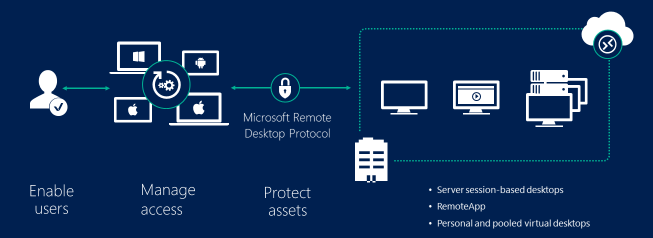

Runs desktop environments on servers and accesses them remotely.
Examples:
- VDI (Virtual Desktop Infrastructure)
- Remote Desktop Services
Used in:
- Enterprises
- Schools
- Remote work
🔹 6. Application Virtualization#


Applications run in isolated environments without full installation.
Examples:
- Sandboxing
- Portable apps
- Wine
🔥 Big Picture Diagram#
Physical Hardware
│
├── Hardware Virtualization → Virtual Machines
├── OS Virtualization → Containers
├── Network Virtualization
├── Storage Virtualization
├── Desktop Virtualization
└── Application Virtualization